Every app in my fleet has been a web app wearing a home-screen icon. This morning that changed. By 11:32 I had my first real, native iPhone app built, tested and signed for my own phone. It’s called Supercharge, and it does one job: drop the dead weight my phone carries around.
TL;DR
- What: Supercharge, a native iPhone cleaner. It finds the junk in the photo library and the address book and clears it in one tap.
- How big: about 1,200 lines of Swift, 3 commits, first build at 11:06, signed for my phone at 11:32.
- Who wrote it: Claude. I said what I wanted, argued about the name and pressed the buttons only I can press.
Why this one had to be native
- A web app on the home screen is a browser tab in a nice suit. It can’t see the photo library and it can’t see storage.
- A cleaner that can’t see the mess is a to-do list. So for the first time, the answer was a real app.
- Real app means Apple’s own toolkit (SwiftUI), a real build, a real signature, and iOS asking permission out loud.
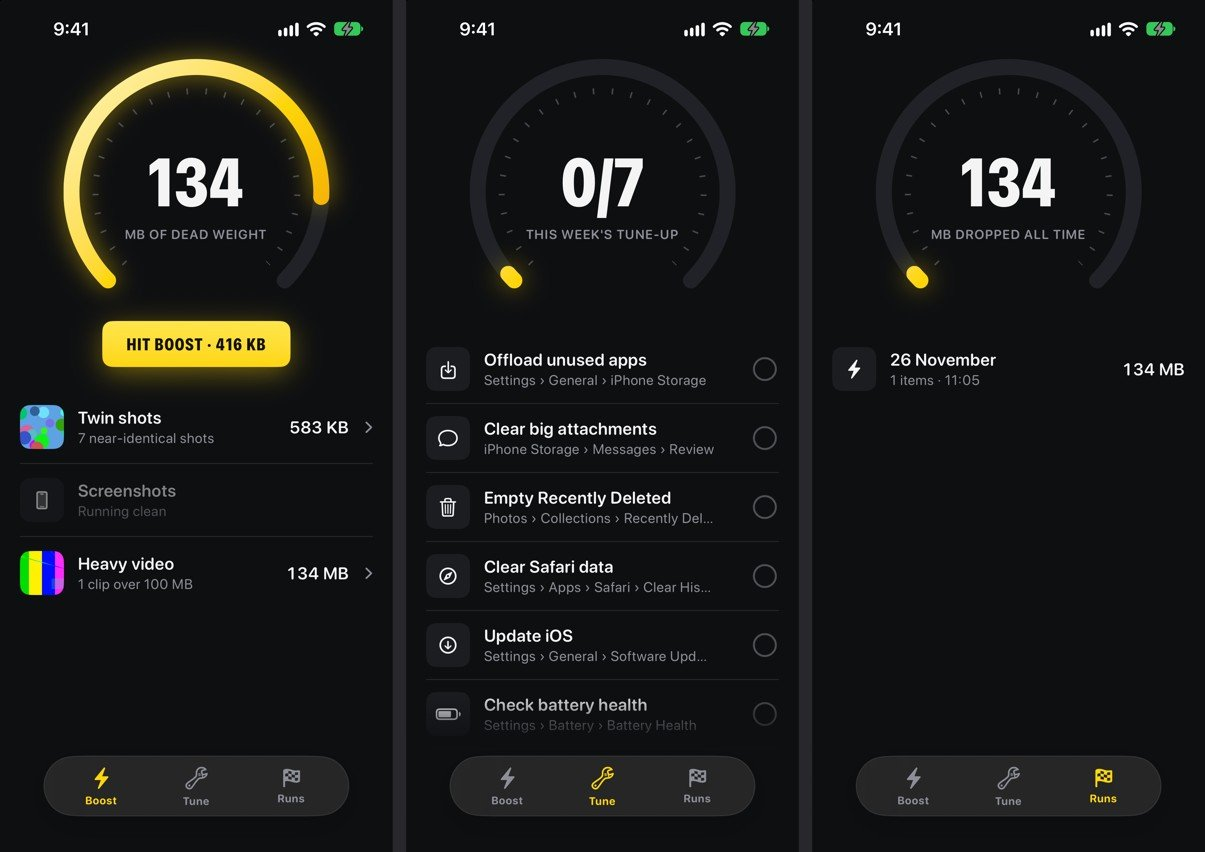
What it does
- Boost: one dial with the dead weight in megabytes, and one yellow button. Under it, the piles: twin shots, screenshots, heavy video over 100 MB, screen recordings, giant photos.
- Twin shots are the clever bit. Apple’s on-device vision model gives each photo a fingerprint. Photos with near-identical fingerprints are the same shot taken five times. Keep the best, drop the rest.
- Double contacts: it asks for the address book only when I tap, then merges doubles into the fullest card.
- Tune: a weekly tune-up checklist. It reads uptime, free space and temperature off the phone and ticks those itself. The rest are one-line directions to the right screen in Settings.
- Runs: the logbook. Every boost, what it dropped, the all-time total. Plus one reminder, Fridays at 9:00.
The honest part
- No iPhone app can clear another app’s cache or free up memory. The ones that say they can are selling a progress bar. Supercharge never says “faster”.
- Nothing is deleted behind my back. Every delete goes through Photos, iOS shows its own confirm, and everything waits 30 days in Recently Deleted.
- It’s all Claude underneath. No team, no agency. One conversation and a build tool.
What I learned
- The project file is 25 lines. A small text file describes the app and a tool generates the whole Xcode project from it. That keeps an agent out of Xcode’s menus.
- The simulator lies a little. Test images loaded into it aren’t marked as screenshots, so that pile is untested until it meets a real phone. The delete prompt also takes 3 to 5 seconds to show up there.
- Naming is still my job. Claude pitched “Pit Stop”. I went with Supercharge: carbon black, volt yellow, a rev counter for a home screen.
- The wall is paperwork, not code. The app took a morning. Getting it onto a phone properly needs a developer account that only I can open.
Next
- Run it on my real phone, against a real photo library, and see what the piles look like.
- A pile for blurry photos.
- Give it an agent with a face, like every other app in the fleet.